
Overview
Purpose
The AWS Integration enables organisations to securely connect their Amazon Web Services (AWS) account with Montro.
Once connected, Montro automatically synchronises supported AWS account information, including cloud resources, IAM users, billing and cost information, monitoring metrics, and other supported AWS resource data into the Montro platform.
This integration provides organisations with centralised visibility into their AWS environment, enabling them to monitor cloud resources, user access, infrastructure usage, security-related information, and cloud spend from within Montro.
The AWS integration currently operates with Read Only access, allowing Montro to securely retrieve and synchronise supported AWS information without performing administrative changes to resources within the connected AWS account.
STEP 1 - Sign in to Montro
Log in to your Montro account using your credentials.
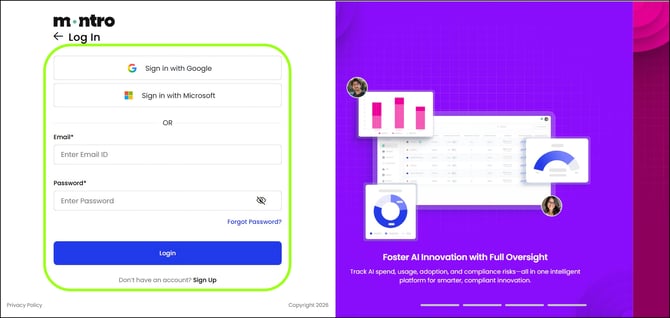 Figure 1 - Montro sign-in screen
STEP 2 - Navigate to the Integrations Section
From the left navigation menu, select Integrations, then locate the AWS integration.
Click Connect to begin the integration process.
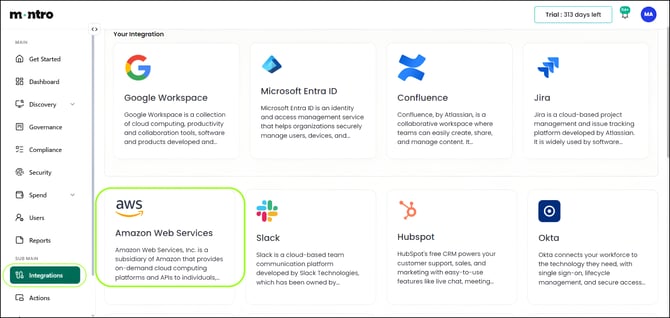 Figure 2 - Integrations section with AWS connector
STEP 3 - Configure the AWS Integration
After clicking Connect on the Amazon Web Services (AWS) integration, the Connect AWS side panel will appear.
The Read permission is selected by default and cannot be changed. The AWS integration currently supports read-only access.
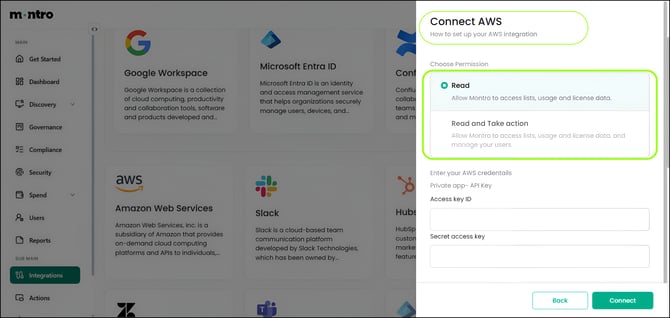 Figure 3 - Connect AWS panel
Enter the following AWS credentials:
- Access Key ID – Enter your AWS Access Key ID.
- Secret Access Key – Enter your AWS Secret Access Key.
After entering the required credentials, click Connect to start the integration.
| NOTE: Ensure that the Access Key ID and Secret Access Key belong to the same AWS account and have the required permissions to access AWS resources. |
Technical Details - AWS Permission Model
The AWS integration uses Read Only permissions to retrieve supported resource, identity, monitoring, and cost information from the connected AWS account.
The AWS credentials provided during setup must have the required AWS managed policies assigned for the resources Montro needs to synchronise.
Required AWS Permissions
| AWS Managed Policy | Purpose |
| AmazonEC2ReadOnlyAccess | Allows Montro to discover AWS regions, EC2 instances, and supported instance information. |
| AmazonS3ReadOnlyAccess | Allows Montro to discover S3 buckets and retrieve supported bucket metadata. |
| AWSBillingReadOnlyAccess | Provides read access to supported AWS billing, cost, usage, and forecast information. |
| AWSCostAndUsageReportAutomationPolicy | Enables access to detailed AWS Cost and Usage Report (CUR) information used for historical spend and usage reporting. |
| AWSResourceExplorerReadOnlyAccess | Provides read access to AWS Resource Explorer for cross-service resource discovery. |
| AWSResourceGroupsReadOnlyAccess | Allows Montro to retrieve supported AWS Resource Groups information and resource metadata. |
| ResourceGroupsandTagEditorReadOnlyAccess | Provides read access to the Resource Groups Tagging API for discovering tagged resources and ARNs across regions. |
| IAMReadOnlyAccess | Allows Montro to retrieve IAM users, supported user metadata, attached policies, MFA information, and AWS account aliases. It is also used during connection validation. |
| CloudWatchReadOnlyAccess | Allows Montro to retrieve supported EC2 CPU monitoring metrics from Amazon CloudWatch. |
| AWSLambdaReadOnlyAccess | Allows Montro to discover Lambda functions and supported function information across AWS regions. |
| AmazonRDSReadOnlyAccess | Allows Montro to discover RDS database instances and supported database information across AWS regions. |
Supported Access
Based on the assigned permissions, Montro can retrieve supported information for:
- EC2 Instances and Regions
- S3 Buckets
- AWS Billing and Cost Information
- Cost and Usage Reports
- AWS Resource Inventory
- Resource Groups and Tags
- IAM Users
- IAM User Policies
- MFA Information
- EC2 Monitoring Metrics
- Lambda Functions
- RDS Database Instances
Permission Dependency
The synchronised information depends on the permissions assigned to the AWS credentials. For example:
- Without AmazonS3ReadOnlyAccess, S3 resources cannot be discovered or synchronised.
- Without CloudWatchReadOnlyAccess, EC2 instances can still synchronise, but their CPU monitoring metrics will not be collected.
- Without AWSLambdaReadOnlyAccess, Lambda functions cannot be discovered.
- Without AmazonRDSReadOnlyAccess, RDS database instances cannot be discovered.
- Without the required resource discovery permissions, the AWS cloud resource inventory may be incomplete.
- Without IAMReadOnlyAccess, IAM users, policy information, and MFA information cannot be synchronised, and connection validation may fail.
- Without the required billing permissions, supported billing, cost, usage, forecast, or detailed Cost and Usage Report information may be unavailable.
Security Notes
- The AWS integration currently operates with Read Only access.
- The Access Key ID and Secret Access Key must have the required permissions for the resources Montro needs to synchronise.
- The provided AWS credentials should be treated as sensitive credentials and should only be entered through the designated AWS integration fields.
- The read-only permissions allow Montro to retrieve supported AWS information without starting or stopping EC2 instances.
- If a required permission is not available, the corresponding AWS resource or information may not be synchronised.
STEP 4 - Verify Synchronisation
After the AWS credentials are successfully validated, Montro automatically starts the synchronisation process.
Once the integration is successfully connected, a Successfully Synced confirmation pop-up appears.
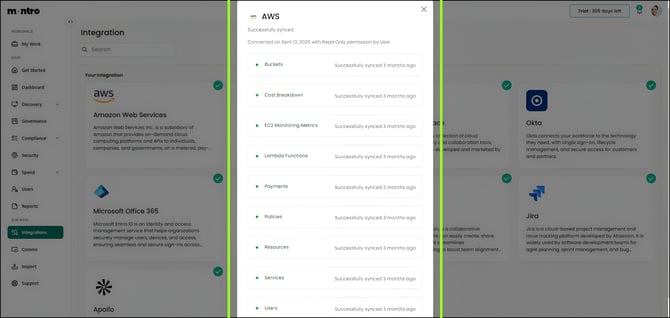 Figure 4 - Successfully Synced confirmation
The synchronisation pop-up displays:
- Integration Status – Displays the current synchronisation status.
- Connected On – Displays the date on which the AWS integration was connected.
- Permission Level – Displays the configured Read Only permission.
- Resources Synchronised – Displays the synchronisation status of supported AWS resources.
The following resources are displayed in the synchronisation status:
- Buckets
- Cost Breakdown
- EC2 Monitoring Metrics
- Lambda Functions
- Payments
When synchronisation is completed successfully, the corresponding resources are marked as Successfully synced.
| NOTE: Data synchronisation may continue in the background. You can safely close the pop-up while Montro completes the remaining synchronisation process. |
Technical Details - Synchronisation Process
After the AWS credentials are successfully validated, Montro uses the configured Read Only AWS permissions to retrieve supported information from the connected AWS account.
Different AWS permissions are used depending on the resource or information being synchronised.
Resources Synchronised
| Resource / Information | AWS Permission | Description |
| EC2 Instances | AmazonEC2ReadOnlyAccess | Discovers AWS regions, EC2 instances, and supported instance information. |
| S3 Buckets | AmazonS3ReadOnlyAccess | Discovers S3 buckets and retrieves supported bucket metadata. |
| Billing, Cost & Usage | AWSBillingReadOnlyAccess | Retrieves supported billing, monthly cost, usage, cost breakdown, and forecast information. |
| Cost & Usage Reports | AWSCostAndUsageReportAutomationPolicy | Provides access to detailed Cost and Usage Report information. |
| Cloud Resource Inventory | AWSResourceExplorerReadOnlyAccess | Supports cross-service resource discovery across the AWS environment. |
| Resource Groups | AWSResourceGroupsReadOnlyAccess | Retrieves supported resource grouping and metadata information. |
| Tagged Resources | ResourceGroupsandTagEditorReadOnlyAccess | Discovers supported tagged resources and ARNs across AWS regions. |
| IAM Users | IAMReadOnlyAccess | Retrieves supported IAM user, policy, MFA, and account information. |
| EC2 Monitoring Metrics | CloudWatchReadOnlyAccess | Retrieves supported EC2 CPU utilisation monitoring metrics. |
| Lambda Functions | AWSLambdaReadOnlyAccess | Discovers Lambda functions and supported function information across regions. |
| RDS Instances | AmazonRDSReadOnlyAccess | Discovers supported RDS database instances across AWS regions. |
AWS APIs Used for Synchronisation
Montro uses supported AWS service APIs including:
| AWS Service / API | Purpose |
| EC2 – DescribeRegions / DescribeInstances | Discovers AWS regions and EC2 instances. |
| S3 – ListBuckets | Retrieves S3 buckets and supported bucket metadata. |
| Cost Explorer – GetCostAndUsage | Retrieves supported AWS cost and usage information. |
| Cost Explorer – GetCostForecast | Retrieves supported AWS cost forecast information. |
| Resource Groups Tagging API – GetResources | Discovers tagged AWS resources and ARNs across regions. |
| IAM Read APIs | Retrieves IAM users, attached policies, MFA devices, and account aliases. |
| CloudWatch – GetMetricStatistics | Retrieves EC2 CPU monitoring metrics. |
| Lambda – ListFunctions | Discovers Lambda functions across AWS regions. |
| RDS – DescribeDBInstances | Discovers RDS database instances across AWS regions. |
Synchronisation Behaviour
The availability of synchronised information depends on the permissions assigned to the AWS credentials. If a required permission is missing, the corresponding resource or information may not be synchronised. For example:
- EC2 instances can still synchronise without CloudWatchReadOnlyAccess, but CPU monitoring metrics will not be collected.
- Missing resource discovery permissions may result in an incomplete cloud resource inventory.
- Missing billing permissions may prevent cost, usage, forecast, or detailed Cost and Usage Report information from being synchronised.
- Missing IAMReadOnlyAccess may prevent IAM user and security information from synchronising and may also affect connection validation.
Security Notes
- AWS synchronisation operates with Read Only access.
- Montro retrieves only the AWS information permitted by the permissions assigned to the provided credentials.
- The supplied permissions are used for resource discovery, identity information, monitoring, and cost synchronisation.
- The integration does not use these permissions to start or stop EC2 instances.
- If a required permission is removed, the corresponding information may no longer synchronise successfully.
STEP 5 - View Imported Applications and Cloud Resources
After the AWS integration is successfully connected and the synchronisation is complete, you can view the imported applications and cloud resources in Montro.
Navigation
- Discovery → All Apps
- Discovery → Cloud
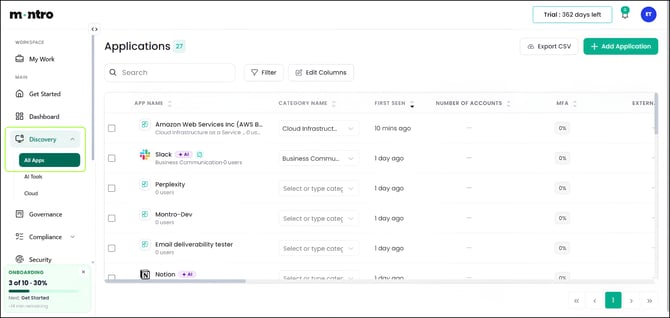 Figure 5 - All Apps / Cloud: imported AWS resources
The synchronised AWS data is available in the following sections:
All Apps
The All Apps page displays the applications imported from your AWS account along with relevant details, such as:
- Application Name
- Category
- First Seen
- First User
- Number of Accounts
- MFA Status
Cloud
The Cloud page displays the cloud resources imported from your AWS account, allowing you to view the synchronised cloud inventory and related resource information.
| NOTE: The displayed applications and cloud resources are based on the data synchronised from your AWS account. If synchronisation is still in progress, additional records may appear once the synchronisation is complete. |
STEP 6 - View Imported Subscriptions
After the AWS integration and synchronisation are completed successfully, navigate to:
Spend → Subscriptions
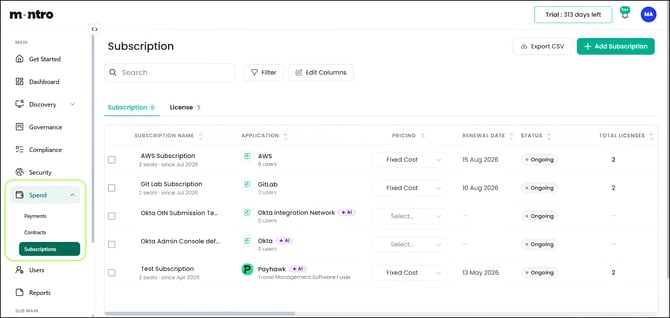 Figure 6 - Subscriptions page
The Subscriptions page displays the subscription information imported from the connected AWS account.
Each subscription may include details such as:
- Application
- Subscription Name
- Start Date
- End Date
- Pricing
- Cost
| NOTE: The subscription and cost information displayed in Montro depends on the billing and cost data available from the connected AWS account. |
AWS Permissions Used
Montro uses the following AWS permissions for billing and cost synchronisation:
| AWS Permission | Purpose |
| AWSBillingReadOnlyAccess | Provides read access to supported AWS billing, account-level spend, cost, usage, and forecast information. |
| AWSCostAndUsageReportAutomationPolicy | Enables access to detailed Cost and Usage Report (CUR) information for historical spend and usage reporting. |
Security Notes
- Billing and cost information is retrieved using Read Only AWS permissions.
- Montro accesses only the billing and cost information permitted by the configured AWS credentials.
- The integration does not modify AWS billing information through these permissions.
- If the required billing permissions are removed, the corresponding billing or cost information may no longer synchronise successfully.
STEP 7 - View Imported Licences
After the AWS integration and synchronisation are completed successfully, navigate to:
Spend → Subscriptions → Licence
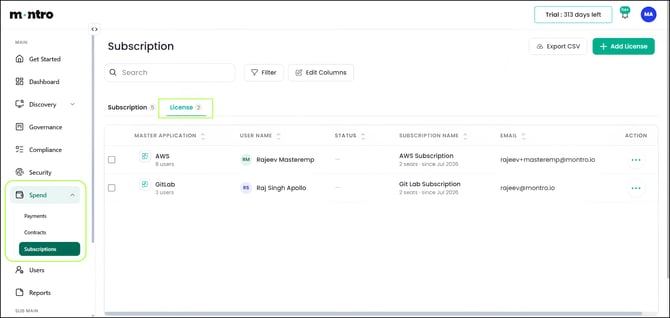 Figure 7 - Licence page
The Licence tab displays the licence information imported from the connected AWS account.
Each licence record may include details such as:
- Master Application
- User Name
- Status
- Subscription Name
- Email Address
| NOTE: The licence information displayed in Montro is based on the user, application, and subscription information synchronised from the connected AWS account. |
Data Used for User Mapping
Based on the supported IAM synchronisation, Montro can retrieve information including:
- IAM User Name
- IAM User ID
- Password Last Used Information
- Attached User Policies
- MFA Enrolment Information
- AWS Account Alias
This synchronised information supports AWS user visibility within Montro.
Security Notes
- AWS user information is retrieved using Read Only IAM access.
- Montro accesses only the IAM information permitted by the configured AWS credentials.
- IAMReadOnlyAccess is used to retrieve supported IAM user and security-related information.
- The provided technical specification does not define AWS licence assign or remove actions for this integration.
STEP 8 - View Imported Users
After the AWS integration and synchronisation are completed successfully, navigate to:
Users → Employees / External Users
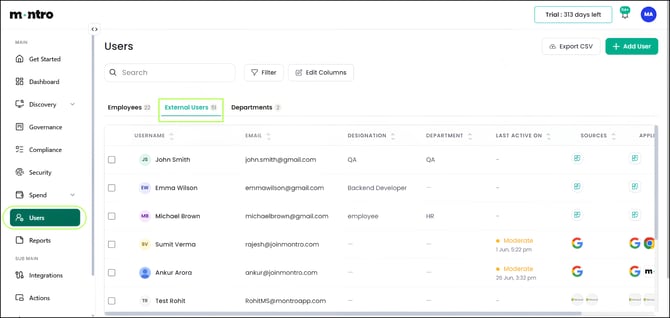 Figure 8 - Employees / External Users: imported AWS users
The Users section displays the user accounts imported from the connected AWS environment.
Each synchronised user may include information such as:
- Username
- Email Address
- Designation
- Department
- Last Active Date
- Source
- Associated Applications
| NOTE: User records are displayed based on the information synchronised from the connected AWS account. Depending on the AWS environment and available information, some fields may appear blank. Newly synchronised users may take a few moments to appear while background synchronisation is completed. |
STEP 9 - Disconnect the Integration
If you need to disable the AWS integration, go to Integrations, locate the AWS connector, and select Disconnect.
Navigation: Integrations → AWS → Disconnect
Once disconnected, Montro stops synchronising data from your AWS account, and the previously provided credentials are no longer used to retrieve information.
| NOTE: Data previously synchronised into Montro remains visible after the integration is disconnected. It will not be updated further until the integration is reconnected with valid AWS credentials. |
Frequently Asked Questions
This section provides answers to commonly asked questions about the AWS integration.
Q1. What is required to connect AWS with Montro?
To connect AWS with Montro, provide a valid Access Key ID and Secret Access Key for the AWS account you want to connect. The AWS credentials must have the required Read Only permissions to access and synchronise supported AWS information.
Q2. What permission level does the AWS integration support?
The AWS integration currently supports Read Only access. This allows Montro to retrieve and synchronise supported AWS information without performing administrative changes to resources in the connected AWS account.
Q3. What AWS permissions are required for the integration?
The AWS integration uses the following permissions:
- AmazonEC2ReadOnlyAccess
- AmazonS3ReadOnlyAccess
- AWSBillingReadOnlyAccess
- AWSCostAndUsageReportAutomationPolicy
- AWSResourceExplorerReadOnlyAccess
- AWSResourceGroupsReadOnlyAccess
- ResourceGroupsandTagEditorReadOnlyAccess
- IAMReadOnlyAccess
- CloudWatchReadOnlyAccess
- AWSLambdaReadOnlyAccess
- AmazonRDSReadOnlyAccess
Each permission provides access to specific AWS information required for supported synchronisation.
Q4. What information is synchronised from AWS?
Based on the configured permissions, Montro can synchronise supported information including:
- EC2 instances and AWS regions
- S3 buckets
- Billing, cost, usage, and forecast information
- Cost and Usage Report information
- AWS cloud resource inventory
- Resource groups and tagging information
- IAM users
- IAM user policies
- MFA information
- EC2 monitoring metrics
- Lambda functions
- RDS database instances
Q5. Does Montro modify AWS resources?
The current AWS integration operates with Read Only access. The provided AWS permissions are used for resource discovery and synchronisation and do not allow Montro to start or stop EC2 instances.
Q6. What happens if a required AWS permission is not provided?
The corresponding AWS information may not be synchronised. For example:
- Without AmazonS3ReadOnlyAccess, S3 buckets cannot be discovered.
- Without AWSLambdaReadOnlyAccess, Lambda functions cannot be synchronised.
- Without AmazonRDSReadOnlyAccess, RDS database instances cannot be synchronised.
- Without the required resource discovery permissions, the AWS resource inventory may be incomplete.
Q7. What happens if IAMReadOnlyAccess is not provided?
Without IAMReadOnlyAccess:
- IAM users cannot be synchronised into the Montro user mapping.
- User policy information will not be synchronised.
- MFA information will not be available.
- AWS account alias information will not be available.
- Connection validation may fail.
IAMReadOnlyAccess is also used during connection validation to verify the AWS credentials before saving the integration.
Q8. What happens if CloudWatchReadOnlyAccess is not provided?
EC2 instances can still be synchronised, but their CPU monitoring metrics will not be collected or updated. Montro uses CloudWatch read access to retrieve supported average and maximum EC2 CPU utilisation metrics.
Q9. What billing and cost information does Montro synchronise?
With the required AWS billing permissions, Montro can retrieve supported information including:
- Billing details
- Service-wise monthly billing
- AWS cost breakdown
- Usage data
- Cost forecasts
- Detailed Cost and Usage Report information
Q10. What happens if AWS billing permissions are not provided?
Without AWSBillingReadOnlyAccess, supported billing data, cost breakdown, usage information, and forecasts will not synchronise. Without AWSCostAndUsageReportAutomationPolicy, detailed Cost and Usage Report information will not be available. Supported high-level billing queries may still work.
Q11. Why are multiple resource discovery permissions required?
Montro uses different AWS resource discovery capabilities to build the supported cloud inventory. AWSResourceExplorerReadOnlyAccess, AWSResourceGroupsReadOnlyAccess, and ResourceGroupsandTagEditorReadOnlyAccess provide access to cross-service resource discovery, resource grouping, metadata, tags, and ARNs. If these permissions are unavailable, the AWS resource inventory in Montro may be incomplete.
Q12. When will changes made in AWS appear in Montro?
Changes to supported AWS resources and information are reflected in Montro after a subsequent successful synchronisation. The availability of updated information depends on the corresponding AWS permissions remaining available.
Q13. Can the synchronisation continue after the status pop-up is closed?
Yes. The AWS synchronisation can continue in the background. The synchronisation status pop-up can be safely closed while Montro completes the remaining synchronisation process.
Q14. Where can I view synchronised AWS information in Montro?
After synchronisation is completed, supported AWS information can be viewed in the following sections:
- Discovery → All Apps – Imported AWS applications
- Discovery → Cloud – AWS cloud resources
- Spend → Subscriptions – AWS subscription and cost information
- Spend → Subscriptions → Licence – Imported licence information
- Users → Employees / External Users – Imported AWS users
Q15. Why are some AWS resources missing from Montro?
Some resources may not appear if:
- A required AWS permission is missing.
- The corresponding resource type cannot be discovered with the configured permissions.
- Cross-service resource discovery permissions are incomplete.
- Synchronisation is still in progress.
Verify that all required AWS permissions are available and that synchronisation has completed successfully.
Q16. Are the AWS Access Key ID and Secret Access Key sensitive?
Yes. The AWS credentials should be treated as sensitive credentials and should only be entered through the designated AWS integration fields in Montro. They are used to authenticate access to the supported AWS information required for the integration.
Q17. Can I disconnect the integration?
Yes. The integration can be disconnected at any time from the Integrations section. Once disconnected, Montro will no longer synchronise data until the integration is reconnected. See Step 9 for instructions.