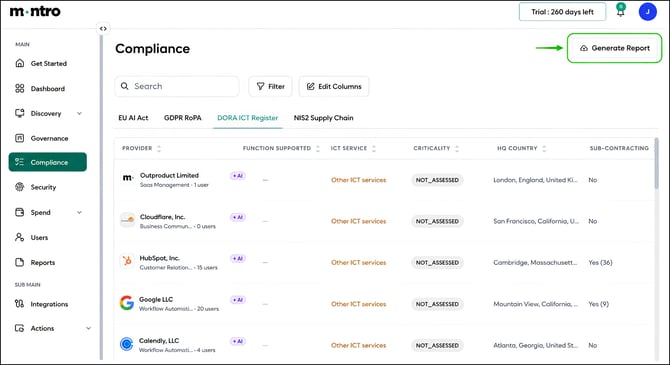
| Overview The DORA ICT Register tab builds your Article 28 ICT Third-Party Register from the applications discovered in your environment. Montro pre-fills provider details, criticality, ICT service type, sub-contracting information, data residency, and contract data where available. Your team completes the fields that only your organisation can supply - particularly exit strategy, function supported, and sensitive data flags. |
Who This Applies To
DORA has applied since 17 January 2025. If your organisation holds a licence from a European financial regulator - as a credit institution, payment institution, investment firm, insurance undertaking, electronic money institution, or in any of the other categories defined under DORA, maintaining a complete ICT Third-Party Register is a mandatory requirement. There is no minimum size threshold.
Accessing the DORA ICT Register Tab
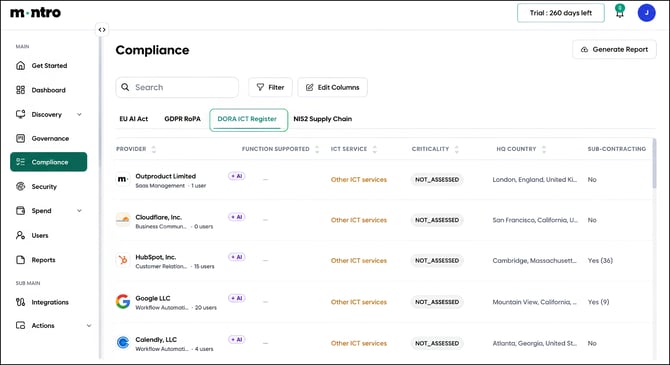
Click Compliance in the left-hand navigation, then select DORA ICT Register from the tab bar.
What You Will See
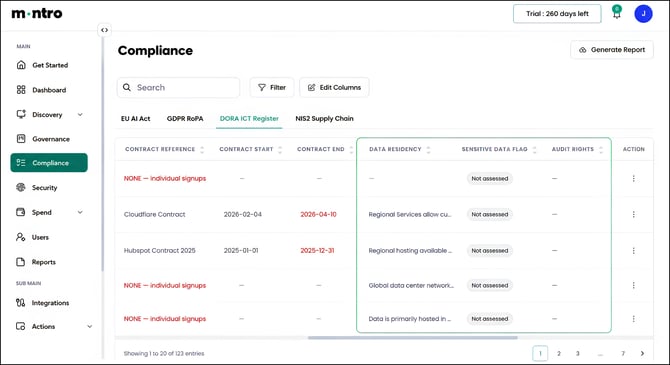
Every application in your discovered estate is listed here as an ICT third-party service. Scroll right to see all columns across the two-screen-wide register. Each column is described below.
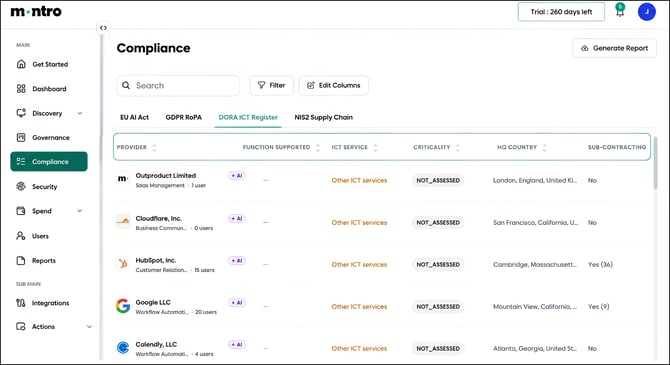
Provider: The legal name of the ICT service provider, pre-filled from Montro’s catalogue.
Function Supported: The business function within your organisation that this service supports. This field requires your input. Under DORA, you must distinguish between providers supporting critical or important functions and those supporting other functions.
ICT Service: The type of ICT service provided, assigned by Montro. Most providers are classified as Other ICT services.
Criticality: Whether this provider supports a critical or important function, assigned by Montro. This is the most significant classification in the register, all other DORA obligations are more demanding for providers supporting critical functions.
HQ Country: Where the provider’s headquarters is registered, pre-filled from Montro’s catalogue. Used for concentration risk assessment.
Sub-contracting: Whether the provider uses sub-contractors, and how many. Pre-filled where Montro has this data - for example, HubSpot shows Yes (36). Under DORA, you must maintain visibility of the sub-contracting chain for critical functions.
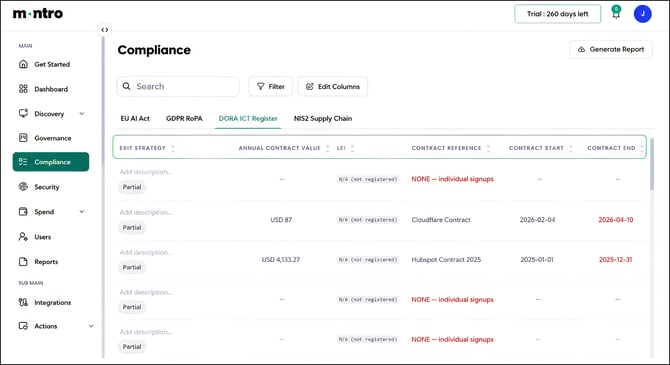
Exit Strategy: How your organisation would exit this provider relationship if necessary. This field requires your input. DORA requires exit strategies to be documented for all ICT third-party relationships.
Annual Contract Value: The annual cost of this ICT service, pre-filled from contract data where available.
LEI: The Legal Entity Identifier of the provider, pre-filled where available. Used in regulatory submissions.
Contract Reference: The reference for the contract governing this relationship. Where no corporate contract exists, this shows as NONE, individual signups in red. This means the provider has no Article 30-compliant contract in place and needs to be remediated.
Contract Start / Contract End: The start and end dates of the contractual relationship. Dates shown in red have expired and need immediate attention.
Data Residency: Where this provider stores and processes data, pre-filled from Montro’s catalogue.
Sensitive Data Flag: Whether this service involves sensitive data, as assessed by Montro.
Audit Rights: Whether your contract with this provider includes audit rights. DORA Article 30 requires audit rights for ICT service contracts. Where no contract exists, audit rights will be absent.
| Tip Check Criticality first. Every other DORA obligation - mandatory contract provisions, exit strategies, resilience testing, audit rights - is more demanding for providers Montro has classified as supporting critical functions. Review the Criticality column early so you know where to focus your effort. |
Completing the Register
Work through the register in this order:
- Review the Criticality classification Montro has assigned for each provider.
- Review the Function Supported field for each ICT service to confirm it accurately reflects your organisation’s use.
- Address providers showing NONE - individual signups by establishing corporate contracts.
- Document exit strategies, starting with critical providers.
- Confirm audit rights are included in contracts for critical providers.
- Review the Sensitive Data Flag for providers handling financial or personal data.
Generating a Report
Select Generate Report to export the DORA ICT Register. Use this as your Article 28 ICT Third-Party Register for supervisory reviews, internal audits, or board reporting.