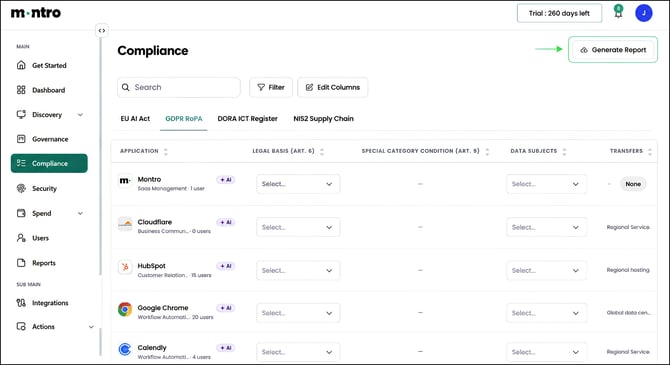
| Overview The GDPR RoPA tab builds your Article 30 Record of Processing Activities directly from your discovered application estate. Montro pre-fills vendor-side data - processors, sub-processor counts, security measures, and transfer information. Your team completes the fields that only your organisation can supply: legal basis, purpose, data subjects, retention periods, and data categories. |
Accessing the GDPR RoPA Tab
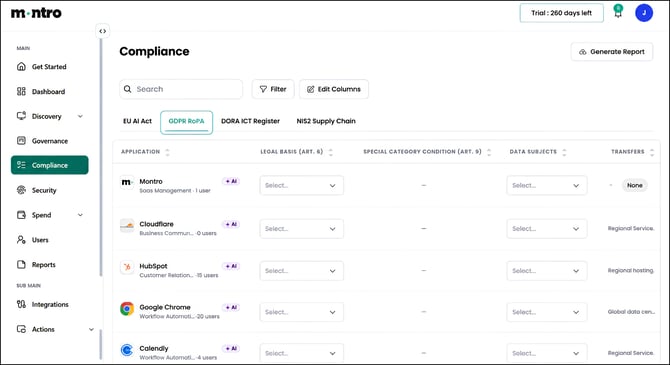
Click Compliance in the left-hand navigation, then select GDPR RoPA from the tab bar.
What You Will See
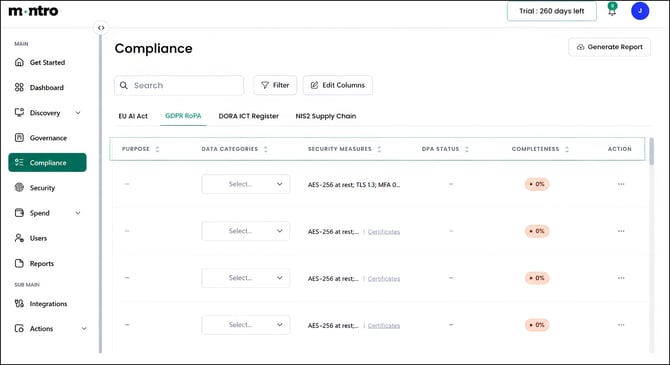
Every application in your discovered estate is listed here as a potential data processor. Scroll right to see all columns. Each column is described below.
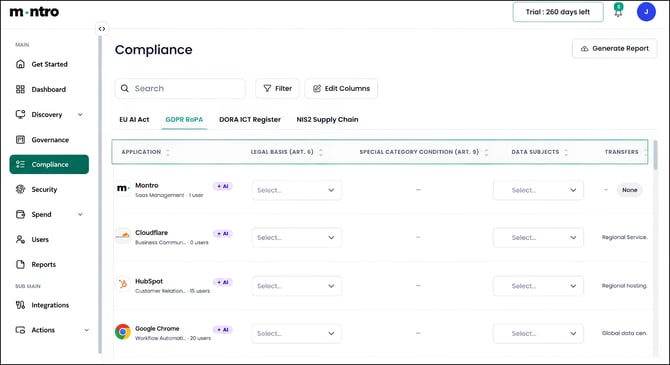
Application: The application name, category, and number of active users. AI-enabled applications are tagged with a purple +AI badge, which is relevant where AI processing creates additional obligations under Article 22.
Legal Basis (Art. 6): The lawful basis under which your organisation processes personal data through this application. Select from the dropdown. This field requires your input - choose the basis that genuinely applies to each processing activity, not the one that seems most convenient.
Special Category Condition (Art. 9): Active only where the application processes special category data such as health, biometric, or political opinion data. Where this applies, an additional Article 9 condition is required alongside the Article 6 basis.
Data Subjects: The categories of people whose data is processed through this application. Examples: employees, customers, website visitors, job applicants. Select all that apply. This field requires your input.
Transfers: The transfer mechanism in place where personal data moves outside the UK or EEA. Montro pre-fills this from vendor data where available. Review any entries marked as Global data centre networks to confirm whether an appropriate transfer mechanism is documented.
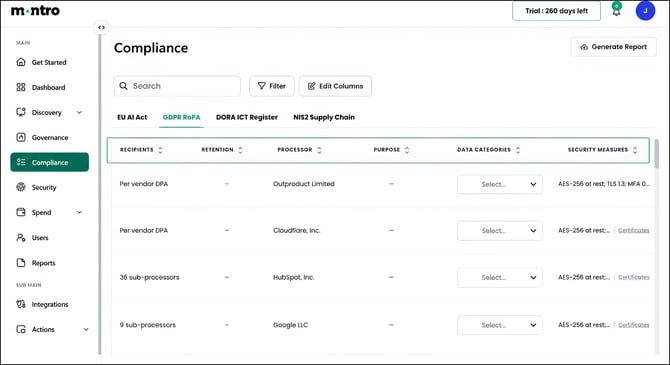
Recipients: The parties to whom personal data is disclosed. For most applications this will be the vendor and their sub-processors. Where Montro has identified sub-processor counts - for example, HubSpot shows 36 sub-processors, these are shown here.
Retention: How long personal data is retained within this application, or the criteria used to determine that period. This field requires your input and should reflect your organisation’s data retention policy.
Processor: The legal entity processing data on your organisation’s behalf, pre-filled from Montro’s catalogue.
Purpose: The specific reason personal data is processed through this application. Be specific: not ‘business operations’ but ‘customer relationship management’ or ‘employee scheduling’. This field requires your input.
Data Categories: The types of personal data processed by this application. Select all that apply from the dropdown. This field requires your input.
Security Measures: Pre-filled from vendor security data. Typically includes encryption standards (AES-256 at rest, TLS 1.3), authentication controls, and available certifications. A Certificates link appears where vendor compliance documentation is available.
DPA Status: Whether a Data Processing Agreement is in place with this vendor, as required by GDPR Article 28. Where no DPA exists, this is a compliance gap that needs resolving.
Completeness: A percentage score showing how many required RoPA fields have been filled for this application. New applications start at 0%. Aim to get all applications that process personal data to 100%.
| Tip Watch for NONE - individual signups in the Contract Reference column (visible in the DORA ICT Register tab). Applications accessed through personal accounts rather than a corporate agreement typically have no DPA in place, no agreed data residency, and no transfer mechanism. These need addressing as a priority. |
Completing Your RoPA
After discovery runs, work through the register in this order:
- Confirm whether the application processes personal data (not every tool does).
- Select the legal basis under Article 6.
- Identify and select the categories of data subjects.
- Select the categories of personal data processed.
- Record the purpose of processing.
- Set the retention period.
- Confirm or update the transfer mechanism.
- Record DPA status and obtain a signed DPA where one is not yet in place.
Generating a Report
Select Generate Report to export the GDPR RoPA. This export serves as your Article 30 Record of Processing Activities for regulatory review, audit, or internal governance.