|
Overview The NIS2 Supply Chain tab gives your organisation a structured view of the security posture of every application in your estate. Montro pre-fills security data for each application - MFA enforcement, SSO status, certifications, encryption, and vulnerability handling, so your team can assess risk without having to gather this information manually. Each application is scored and given a risk level to help you prioritise. |
Who This Applies To
NIS2 applies to medium and large organisations (50+ employees or €10M+ turnover) operating across 18 critical and important sectors, including energy, transport, banking, health, digital infrastructure, and manufacturing. If your organisation is in scope, Article 21 requires you to assess and document supply chain security.
Accessing the NIS2 Supply Chain Tab
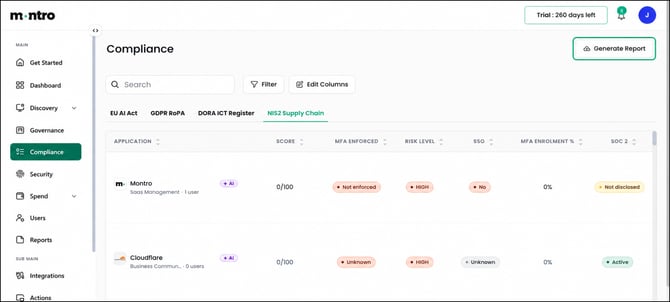
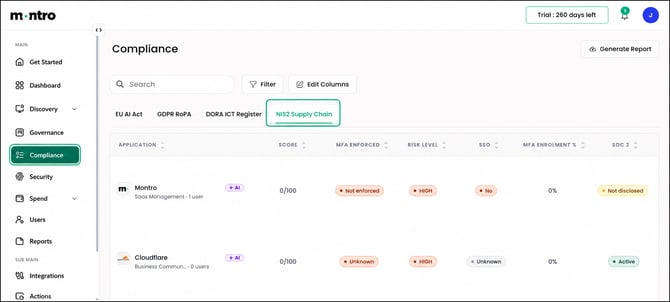
Click Compliance in the left-hand navigation, then select NIS2 Supply Chain from the tab bar.
What You Will See
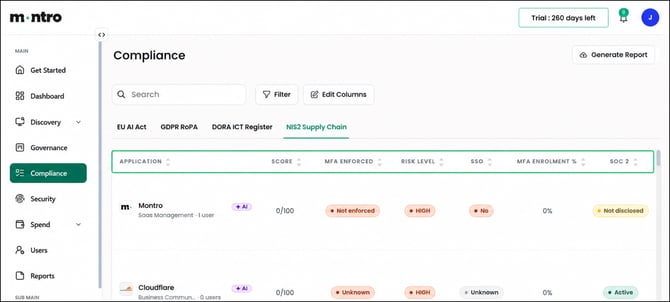
Every application in your discovered estate is listed here. Each row represents one supply chain relationship. Scroll right to see all columns. Each column is described below.
Application: The application name, category, and active user count. AI-enabled applications are tagged with a purple +AI badge.
Score: A security posture score out of 100, calculated from the security attributes Montro has confirmed for this application. A score of 0/100 means no security attributes have been confirmed, either because the vendor has not published them or because no security provider integration is active. A higher score reflects a stronger documented security baseline.
MFA Enforced: Whether multi-factor authentication is enforced for this application. NIS2 Article 21 lists MFA as a required security measure. Applications showing Not enforced or Unknown should be reviewed and, where possible, MFA should be enforced through your identity controls.
Risk Level: The supply chain risk level for this application. Most new applications default to HIGH. Risk level is based on a combination of security posture, user exposure, and governance status. Applications showing HIGH with a low score are the highest-priority group.
SSO: Whether the application is connected to your single sign-on identity provider. SSO-connected applications are visible through your identity governance layer. Applications showing No or Unknown are outside that perimeter.
MFA Enrolment %: The percentage of active users enrolled in MFA for this application. A 0% rate on an application with many users is a significant gap. Use this column to identify where user-level MFA remediation is needed.
SOC 2: Whether the vendor holds a current SOC 2 certification. SOC 2 is a US framework and not a direct NIS2 requirement, but it is a widely used proxy indicator of security programme maturity.
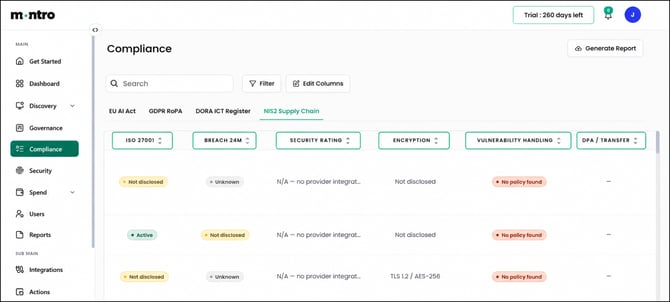
ISO 27001: Whether the vendor holds a current ISO 27001 certification. ISO 27001 is the most relevant international security standard for NIS2 supply chain assessments. Not disclosed means the vendor has not published their certification status.
Breach 24M: Whether the vendor has had a publicly reported data breach in the past 24 months. Used as a risk signal when assessing supply chain exposure.
Security Rating: Where Montro is integrated with a security rating provider, the vendor’s external security rating is shown here. N/A - no provider integrated means no security rating integration is currently active for your account.
Encryption: The encryption standard in use for data at rest and in transit, pre-filled from vendor documentation where available.
Vulnerability Handling: Whether the vendor has a published vulnerability disclosure policy. No policy found means no documented vulnerability management process has been identified, which is a risk indicator.
DPA / Transfer: Whether a Data Processing Agreement is in place and what transfer mechanism applies. This links the supply chain register to your GDPR obligations, as many supply chain relationships also involve personal data.
|
Tip Use Score and Risk Level together. Sort by Risk Level to bring HIGH-rated applications to the top, then look at Score to prioritise within that group. A HIGH risk application with a score above 60 may already have strong security controls in place. A HIGH risk application with a score of 0 has nothing confirmed and needs attention first. |
Working Through the Register
- Start with applications showing HIGH risk level and 0/100 score.
- For each, check whether MFA is enforced at the vendor level or can be enforced through your identity controls.
- Connect applications to SSO where supported to bring them into your identity governance perimeter.
- Review ISO 27001 status for critical suppliers - request certifications directly from vendors where not published.
- Identify applications with No policy found under Vulnerability Handling and raise with the vendor.
- Ensure applications with significant user exposure have a corporate contract with documented security obligations.
Generating a Report
Select Generate Report to export the NIS2 Supply Chain register. Use this to demonstrate supply chain security governance to national competent authorities, internal auditors, or customers conducting their own due diligence on your organisation.