|
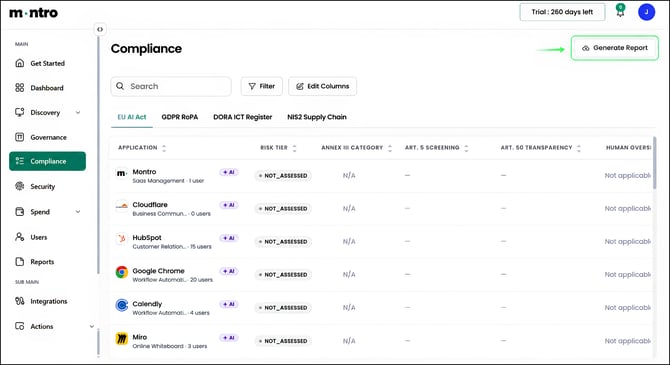
Overview The EU AI Act tab builds an AI system inventory from your discovered application estate. Montro identifies which applications have AI capabilities and assigns a risk tier based on its classification of each tool. Your team then completes the deployer-specific fields - such as use case, human oversight status, and FRIA - that only your organisation can supply. |
Accessing the EU AI Act Tab
Click Compliance in the left-hand navigation, then select EU AI Act from the tab bar. This is the default tab when you open Compliance.
What You Will See
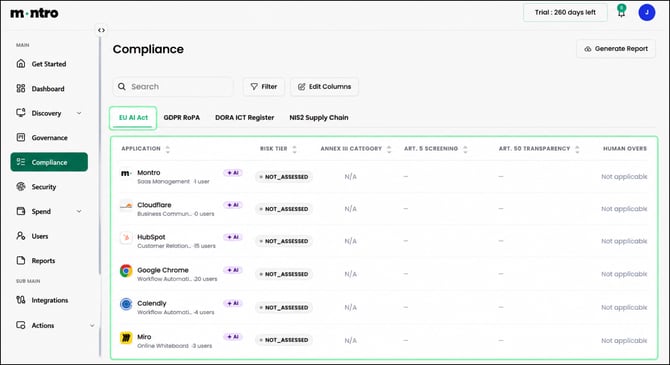
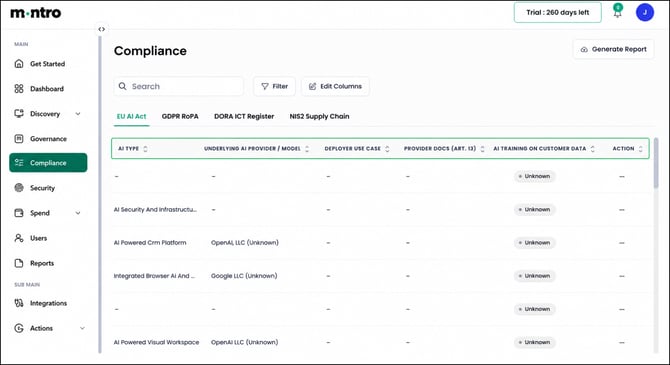
Every application in your estate with AI capabilities is listed here. Scroll right to see all columns - the register is wide. Each column is described below. Applications appear with one of two AI badges: a lighter +AI badge labelled AI Enabled (a non-AI application that has layered AI features added to it, such as Confluence or Slack) or a darker filled +AI badge labelled AI Native (the application itself is an AI product, such as OpenAI). Hover over the badge to see which type applies.
Application: The application name, category, and number of active users in your organisation.
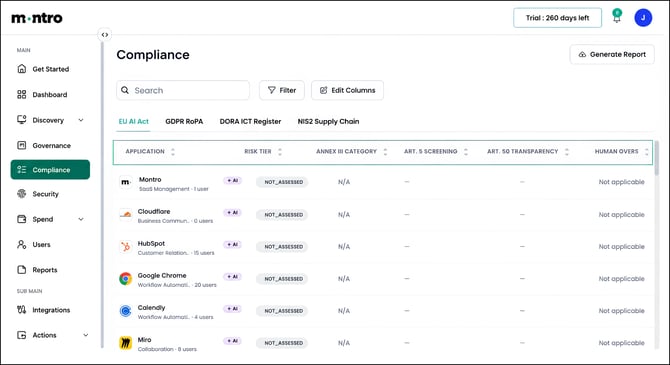
Risk Tier: Montro’s classification of the application against the EU AI Act risk pyramid. Risk tiers are assigned by Montro based on the nature of the application. The possible tiers are:
- Minimal risk - most everyday productivity and collaboration tools
- Limited risk - tools subject to transparency disclosures under Article 50
- High risk - systems listed in Annex III, including AI used in employment decisions, credit scoring, law enforcement, and essential services
- Unacceptable risk - systems prohibited under Article 5
Annex III Category: For high-risk applications, this identifies which Annex III category applies. The category determines which specific deployer obligations you need to meet.
Art. 5 Screening: Whether this application has been checked against the list of prohibited AI practices in Article 5 - for example, emotion recognition in the workplace or subliminal manipulation. This requires your team’s assessment.
Art. 50 Transparency: For limited-risk systems, Article 50 requires that users are told they are interacting with an AI. This column tracks whether those disclosures are in place.
Human Oversight (Art. 26(2)): For high-risk systems, records whether your organisation has implemented oversight measures with genuine authority to intervene or override AI decisions.
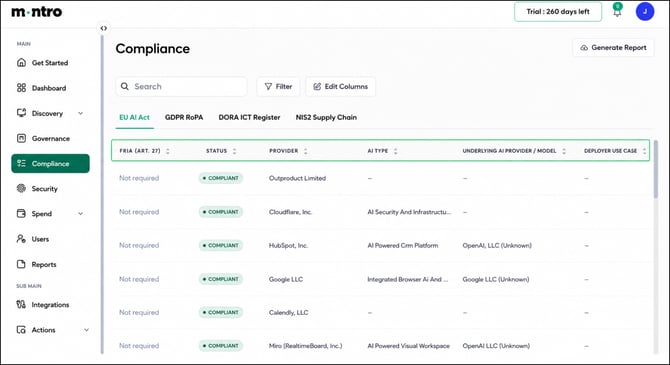
FRIA (Art. 27): Tracks whether a Fundamental Rights Impact Assessment has been completed or is required for this application.
Status: The overall compliance status calculated from the fields completed. Applications with all required fields filled and no unresolved issues show as COMPLIANT.
Provider: The legal entity that supplies the application, pre-filled from Montro’s catalogue. The Legal Entity Identifier (LEI) is shown where available.
AI Type: A description of the AI capability within the application, for example: AI Powered CRM Platform or Integrated Browser AI.
Underlying AI Provider / Model: Where an application uses a third-party AI model, Montro identifies the provider. For example, HubSpot is shown as using OpenAI. This is relevant for understanding your AI supply chain.
Deployer Use Case: Your organisation’s specific use of this AI system. This field requires your input. The same tool can carry different risk tiers depending on how it is deployed, so this field matters.
Provider Docs (Art. 13): Records whether you have received and reviewed the provider’s instructions for use, as required under Article 13 for high-risk systems.
AI Training on Customer Data: Records whether the vendor uses your organisation’s data to train AI models. This affects both your AI Act obligations and your GDPR position.
Working Through the Register
When you open the EU AI Act tab, Montro will have pre-filled the risk tier and vendor data for discovered applications. Your team’s job is to complete the deployer-specific fields. Work through each application in this order:
- Review the application and its AI type description.
- Check for any Article 5 prohibited practice concerns and record the screening outcome.
- Review the risk tier Montro has assigned and confirm it reflects how the tool is used in your organisation.
- For high-risk applications: complete the Annex III category, human oversight, and FRIA fields.
- For limited-risk applications: confirm Article 50 transparency disclosures are in place.
- Record the deployer use case and confirm provider documentation has been received.
|
Tip Use case affects how the risk tier is applied. The same tool can carry different obligations depending on how your organisation deploys it. Always record the Deployer Use Case so the risk tier can be correctly interpreted in context. |
Generating a Report
Select Generate Report to export the EU AI Act register. Use this as the basis for your AI system inventory, board reporting, or responses to regulatory enquiries.