
|
Overview The Support Hub is built directly into Montro. From here you can submit a question or issue to the Montro team, share feedback about the platform, or reach the team by phone or email. You do not need to leave the platform to get help. |
Accessing Support
To get to the Support Hub in Montro:
- Go to app.montro.io/login and sign in with your Montro credentials.
- In the left-hand navigation, under SUB MAIN, click on Support.
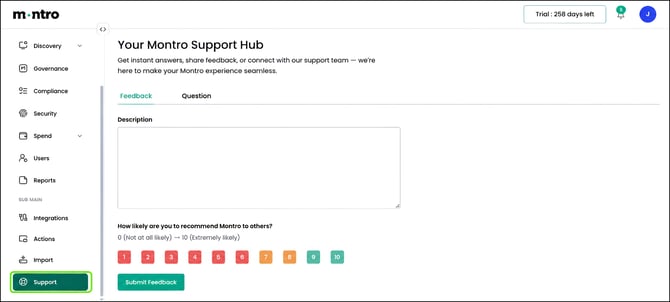
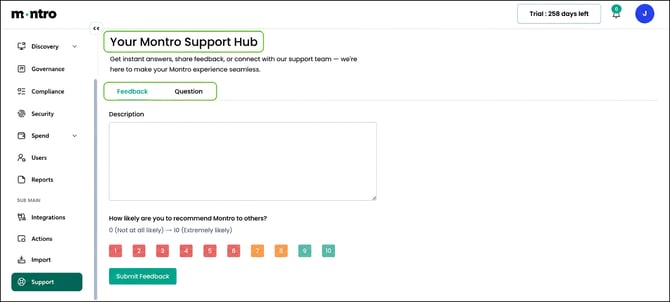
- The Your Montro Support Hub page opens, with two tabs: Feedback and Question.
How to Reach the Montro Team
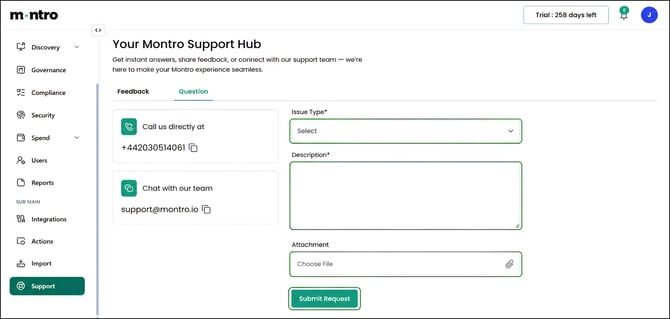
If you prefer to get in touch directly rather than submitting a form, the Question tab shows two contact options:
Call us directly at +442030514061
Chat with our team at support@montro.io
|
Response time The Montro team responds to all queries within 24 hours. |
Submitting a Question or Issue
If you have a question about the platform or need help resolving an issue, use the Question tab to submit a request directly to the Montro team.
- Click on the Question tab at the top of the Support Hub.
- Select an Issue Type from the dropdown - this is required.
- Enter a Description of your question or issue - this is required. Include as much detail as possible so the team can help you quickly.
- Attach a file if relevant - use the Attachment field to upload a screenshot or document that helps illustrate the issue.
- Click Submit Request to send your query to the Montro team.
|
Tip - what to include in your description The more detail you provide, the faster your issue can be resolved. Try to include:
|
Submitting Feedback
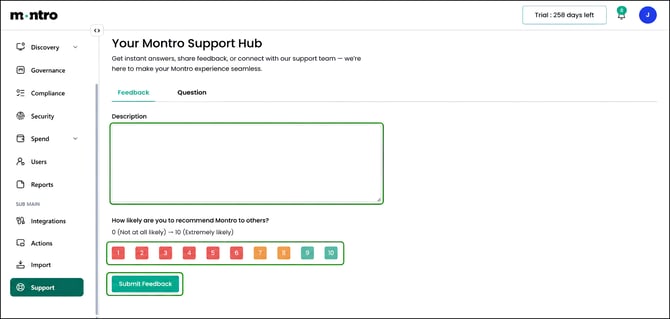
If you want to share feedback about your Montro experience, whether something is working well or something could be improved, use the Feedback tab.
- Click on the Feedback tab at the top of the Support Hub.
- Enter your feedback in the Description field.
- Rate how likely you are to recommend Montro to others using the 0–10 scale. Select a number from 0 (Not at all likely) to 10 (Extremely likely).
- Click Submit Feedback to send your response to the Montro team.
Feedback is reviewed by the Montro team and helps shape how the platform develops. You do not need to raise an issue to leave feedback, general thoughts and suggestions are always welcome.
Troubleshooting Before You Reach Out
If something isn’t working as expected, it’s worth trying a few things before submitting a request:
- Check your permissions. Some features in Montro are only visible to users with specific roles. If you cannot see or access something, confirm your role with your Montro administrator.
- Try refreshing the page or signing out and back in. Some display issues resolve with a fresh session.
- Check your integrations. If Discovery is not surfacing assets you would expect, verify that the relevant integrations are connected and syncing.
- Look for error messages. If Montro shows an error, take a screenshot and include it when you submit your request.
- Browse this help centre. The articles here cover the main features of Montro and may already answer your question.
Best Practices
Use the Question tab for anything that needs a response - platform issues, how-to questions, or account queries.
- Use the Feedback tab to share general thoughts, suggestions, or your NPS rating.
- Include an attachment when reporting an issue, a screenshot often tells the team more than a description alone.
- If your issue is urgent, mention it clearly at the start of your Description so the team can prioritise accordingly.
- For immediate help, call the team directly at +442030514061 or email support@montro.io.